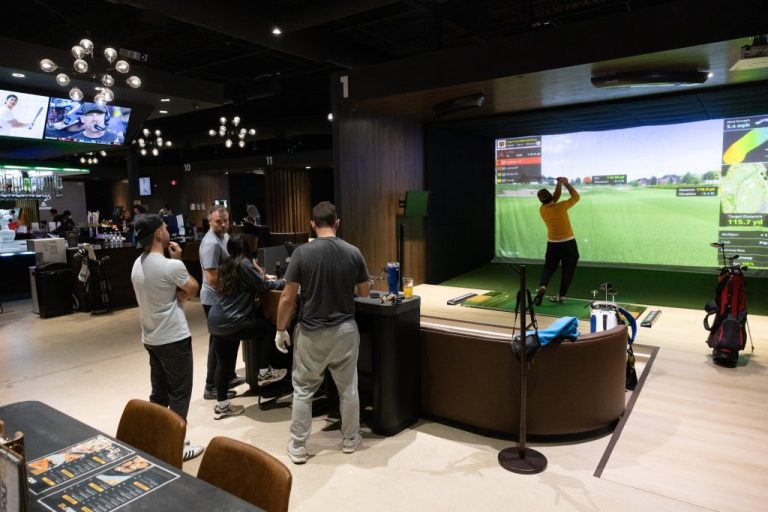
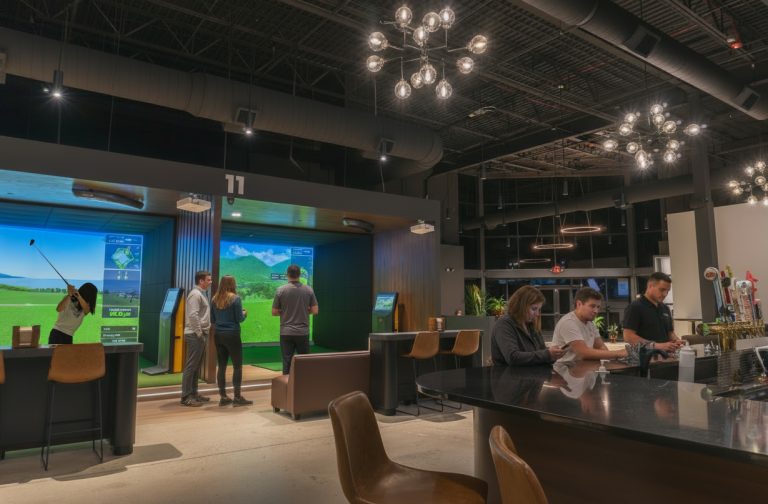
Never swung a club indoors before? You’re probably not sure what to expect, and that’s fine; most people aren’t on their first visit. What’s interesting is how consistently that uncertainty flips. First-timers tend to walk out already thinking about when they’re coming back. It doesn’t matter if you’ve played golf before or if this is genuinely your first time holding a club; indoor golf is a lot more welcoming than the sport’s reputation suggests. This guide walks you through everything, from the moment you arrive to your last shot of the session.
Why Must You Visit an Indoor Golf Simulator Venue?
Indoor golf isn’t just a rainy-day substitute for the real thing. It gives you something a traditional course or driving range genuinely cannot. Real-time feedback on every single shot, access to world-famous courses you’d otherwise never play, and a social atmosphere that makes the whole experience enjoyable, whether you’re there to improve or just have a good time, all this makes indoor golf for beginners as well as pro players completely worth it.
No tee time to chase, no weather to check, and nobody watching you figure things out, that combination makes a real difference, especially if you’re new. On a real course, being a beginner is visible to everyone around you. Here, it isn’t. You move at your own pace, the technology gives you instant feedback, and the whole setup is designed around making you comfortable rather than testing whether you already know what you’re doing.
What Happens When You Arrive at an Indoor Golf Simulator?
Walking in for the first time indoor golf simulator venue and being curious about what will actually happen is the most reasonable question; most people expect something complicated. But it’s actually pretty straightforward. Take a look at how the first few minutes typically unfold.
Check-In Process
When you arrive, walk up to the front desk with your booking confirmation. You’ll be assigned a specific simulator bay for your session. Bays are typically private or semi-private, so you’re not sharing a screen with strangers. From there, someone will walk you to your bay and get you set up.
Staff Walkthrough
Before you hit your first shot, a staff member will run through the basics with you. This covers how to navigate the on-screen controls, which game modes are available for your session, the best golf courses to play on simulator, how to set up your shot, and where to place the ball on the tee. Don’t feel like you need to absorb everything in one go. Staff are accustomed to explaining this multiple times.
Getting Comfortable
First-timers show up here every single day. It’s not unusual, and nobody on staff is keeping score of how polished your swing looks. The bay is yours for the session; there’s no audience, no performance expectation, and no particular way you’re supposed to behave in it. Some people spend the whole time on one hole. Others try five different courses. Both are fine. The only thing that actually matters is that you enjoy the time.
What Should You Wear to an Indoor Golf Simulator?
Confused about what to wear to a golf simulator? See, nobody shows up to their first indoor golf simulator session dressed wrong, but a few clothing choices do make a real difference once you’re actually swinging. Golf attire isn’t expected or required. Here’s what actually works:
- Comfortable athletic clothing: Think gym wear or anything you’d move freely in. The swing involves a full shoulder and hip rotation, so whatever restricts that is going to feel awkward fast, even if it looked fine when you left the house.
- Clean sneakers: Completely fine at any indoor simulator venue. Golf shoes are welcome if you own them, but they won’t change much about your first session. Don’t go out and buy a pair before you come.
- Avoid restrictive clothing: Jeans are the main culprit here. Dress and trousers too. Anything that pulls tight when you rotate your hips will cut your swing short and make the whole thing feel harder than it is.
- Layers: Bays are climate-controlled, but how warm or cold you run is a personal thing. If you tend to heat up when you’re active, a light layer you can take off is worth thinking about.
What Equipment Do You Need at an Indoor Golf Simulator Venue?
Most first-timers assume they need to bring a full bag of clubs and their own gear; actually, you don’t. Indoor golf venues are set up to accommodate players who arrive empty-handed, and the essentials are either provided or available to rent on-site.
- Most venues provide a set of loaner golf clubs at no extra charge. If you own clubs and are comfortable with them, bringing your own is fine, but it’s not necessary for a first visit.
- You do not bring your own golf balls. The venue supplies balls, and they’re designed to work specifically with the simulator’s sensors. Using outside balls is not recommended.
- Optional, but worth bringing if you own one. They’re not required and won’t affect how the simulator reads your shots.
- Nothing else is required. Show up, get assigned a bay, and the technology handles the rest.
| Quick Answer: For a first visit to an indoor golf simulator, you don’t need to bring anything except yourself. Clubs and balls are provided. Wear comfortable athletic clothing and clean sneakers, and you’re set. |
How Does the Simulator Actually Work?
The Golf VX simulators use the T2, FA, and Quantum platform, equipped with AI-powered cameras and sensors that track your club and ball the moment you make contact. The system captures ball speed, launch angle, spin rate, and direction; then instantly projects your shot onto a high-definition screen showing your ball flying across a photorealistic course. There’s essentially zero lag between your swing and what you see on screen, which is part of what makes the experience feel genuinely immersive rather than like a video game.
After each shot, the screen displays key metrics: ball speed, carry distance, and shot shape. In practice modes, you’ll also see swing path and face angle data. You don’t need to understand how to use a golf simulator and all the metrics on your first visit, but it’s there if you want it, and it’s exactly the kind of feedback that makes simulator sessions genuinely useful for improvement. For anyone curious about golf swing basics, that data becomes a natural starting point.
What Games and Modes Can You Play?
Golf VX isn’t just a place to play 18 holes virtually; there are several ways to use a session depending on what you’re after. This is worth knowing before you arrive, because first-timers often assume it’s one-size-fits-all.
Course Play
With access to 380+ real-world golf courses, course play is the headline feature. You select a course, choose the number of holes, and play through it just as you would outdoors. If you’re wondering about the best golf course to play on a simulator, Pebble Beach is a perennial favorite for first-timers and is considered the best golf course to play on simulator by beginners, visually spectacular and immediately recognizable even if you have indoor golf no experience and have never watched professional golf.
Practice Modes
For anyone who wants to work on specific parts of their game rather than play a full round, Golf VX offers dedicated practice modes covering the driving range, short game, and putting. These are particularly useful for beginners who want to get a feel for the swing without the structure of a scored round. If you’re comparing this type of focused session to outdoor alternatives, our indoor golf vs driving range breakdown covers the differences in detail.
Arcade and Casual Games
Not every session needs to be serious. Golf VX includes arcade-style games alongside the simulation modes, which are particularly suitable for targeting challenges and casual formats that work well for groups where skill levels vary. These are consistently popular for hosting indoor golf simulator events for corporate and social outings because they require no golf knowledge to enjoy and are also suitable for golfers who have never played golf indoor simulator.
Competitive Formats
For those who want more structure, Golf VX runs indoor golf simulator leagues and golf tournaments with handicap scoring that levels the playing field across skill levels. These aren’t just for experienced golfers; the format is designed to be accessible, and the competitive element adds a layer of motivation that casual sessions don’t always provide.
Why Golfers Choose Golf VX for Their First Simulator Experience
If you’ve been searching for golf simulators near me and want to know what separates Golf VX from other options, it comes down to the technology, the social and lively atmosphere with food and beverage, and the experience design. Golf VX uses its own simulator platforms, featuring an auto-tee system that sets up your ball automatically, a moving swing plate with three distinct hitting surfaces, and AI-powered sensors that deliver instant, accurate swing data with zero lag and provides you clear idea of how does indoor golf works. The HD screen brings 380+ global courses to life in a way that feels genuinely immersive, not like a game.
Beyond the technology, Golf VX venues are built for comfort. Spacious simulator bays and a relaxed lounge atmosphere make it equally suitable for a solo practice session, a date night, or a group outing. For players who want to make it a regular habit, indoor golf membership options are available with daily access and member-only perks. With Golf VX venues, you just don’t get a place to play; you get the experience.
Find your nearest venue and book a session at Golf VX Locations.
Conclusion
Your first indoor golf simulator session is going to be more straightforward and more enjoyable than you’re probably expecting. You don’t need experience, special equipment, or any preparation beyond knowing what to wear and showing up. The technology handles the complexity, the staff handles the setup, and your job is simply to swing and see what happens. Golf VX is built specifically for that kind of accessible, no-pressure entry point into the game, and for the players who come back week after week, realize how good it actually feels to play indoors.
FAQs
Are Golf Simulators Good For Beginners?
Yes, golf simulators are arguably better for beginners than a real course. The controlled environment, instant feedback, and zero social pressure make it much easier to learn and build confidence without the intimidation of playing outdoors.
Should I Wear Golf Shoes To An Indoor Simulator?
They’re not required. Sneakers work perfectly well, and most first-timers don’t own golf shoes. If you have them, you’re welcome to wear them, but they won’t make a significant difference in your first session.
Do You Bring Your Own Balls To A Golf Simulator?
No. The venue provides balls specifically calibrated for the simulator’s sensors. Bringing outside balls isn’t recommended and typically isn’t permitted.
What Not To Wear At A Golf Course?
Avoid restrictive clothing like tight jeans, dress trousers, or anything that limits shoulder and hip rotation. For indoor golf, the standard is simply comfortable athletic wear. Formal golf dress codes don’t apply at simulator venues.
What To Bring To A Golf Simulator?
If you are confused about what to bring to a golf simulator, the answer is just yourself and appropriate athletic clothing. Clubs and balls are provided. If you own a glove and prefer using it, bring it, but it’s optional.
How Good Are Indoor Golf Simulators?
Modern golf simulators are highly accurate, tracking ball speed, spin, launch angle, and direction with AI-powered sensors and near-zero lag. The experience is genuinely close to outdoor play in terms of feel and data quality. For more on the modern indoor golf experience, we’ve covered it in detail.